


Orca Slicer temperature settings, explained
Temperature settings tell the printer how hot to run the nozzle and the bed, and they are set per filament because every material melts and sticks at a different heat. Too cool and layers do not bond or the print will not stick to the plate; too hot and it strings, oozes and sags. These are among the first values to get right for a new spool, since flow, adhesion and surface finish all depend on them. In the material settings they are split into nozzle temperature and bed temperature.
You will find them in the material settings, on the Filament tab, under Print temperature and Bed temperature.
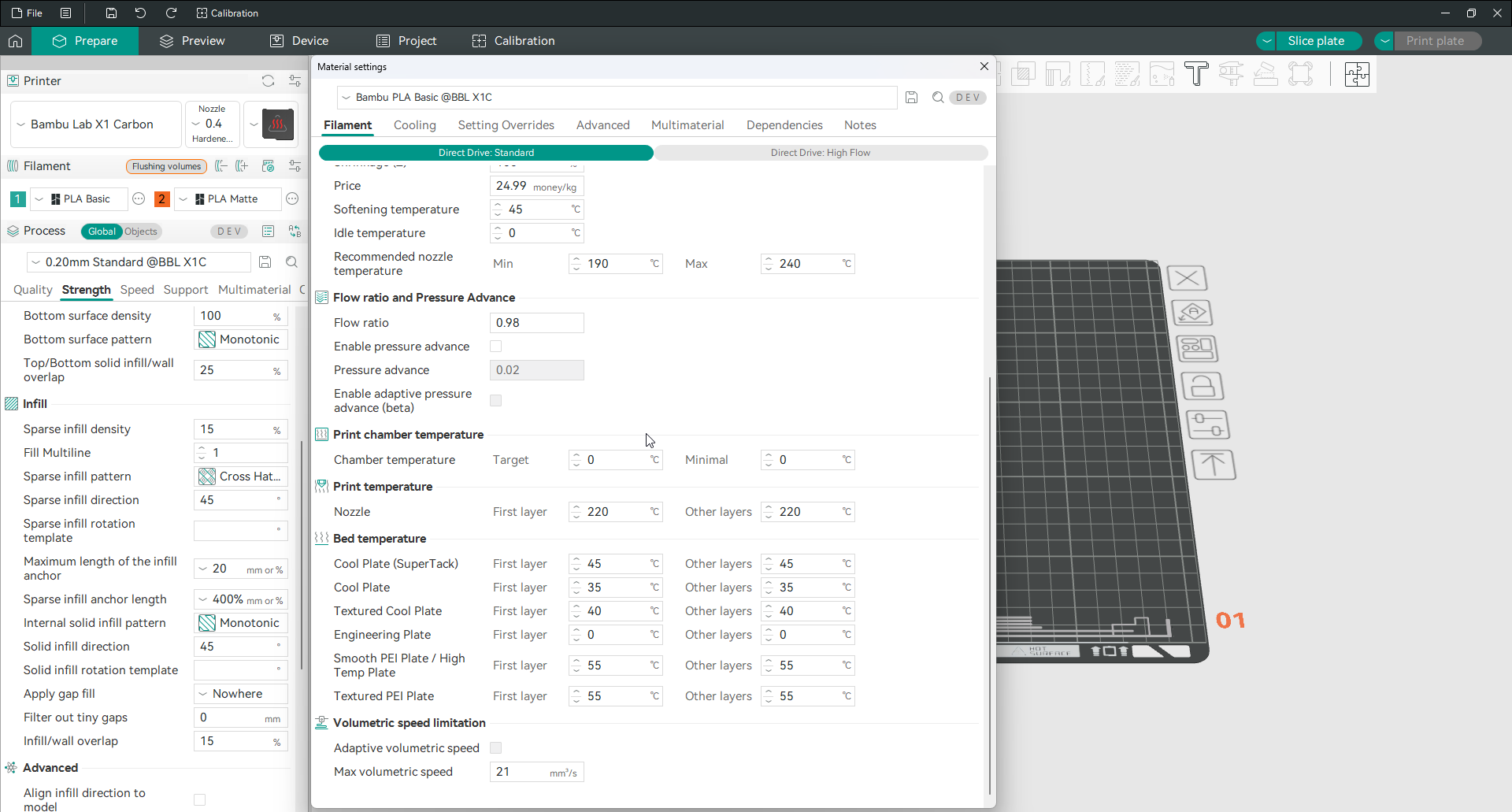
Nozzle temperature
The nozzle temperature, shown as Print temperature, sets how hot the hotend runs, with a separate value for the first layer and for the other layers. Each material has its own range, printed on the spool: PLA runs cool, around 190 to 220 degrees, PETG warmer at roughly 230 to 250, ABS and ASA higher again near 240 to 260, and TPU around 220 to 240. The first layer is often set a few degrees hotter than the rest to help it bond to the plate. The reliable way to find the best value for your exact filament is the temperature tower test, which prints a range and lets you pick the cleanest.
Bed temperature
The bed temperature holds the first layers down while they cool. It too has a first layer and other layers value, and the right number depends on both the material and the plate. PLA sits around 55 to 60 degrees, PETG near 70 to 80, and ABS and ASA around 90 to 100. The software lists a temperature for each named build plate, such as a textured PEI or a smooth high-temperature plate. The value follows whichever plate you have selected. Match the plate in the software to the one on your printer and the correct bed temperature comes with it.
Chamber and recommended range
Two related values sit nearby. The recommended nozzle range is a safety window for the filament, a minimum and maximum the software keeps you within. The chamber temperature, for enclosed printers, is a separate control covered on the chamber temperature control page. It is left at zero for materials that do not need a heated enclosure. Which build plate you choose is set alongside your bed types. Once temperature is dialled in, calibrating flow rate builds on it.
Frequently asked questions
What temperature should I print at in Orca Slicer?
It depends on the material. PLA runs around 190 to 220 degrees at the nozzle, PETG about 230 to 250, ABS and ASA near 240 to 260, and TPU around 220 to 240. Start from the range on the spool, then run a temperature tower to find the exact value that prints cleanest for your filament.
What bed temperature should I use?
PLA usually wants a bed around 55 to 60 degrees, PETG near 70 to 80, and ABS or ASA around 90 to 100. The exact number also depends on your build plate, and the software stores a temperature for each plate type, so pick the plate that matches your printer and the right value follows.
Should the first layer be hotter?
Often, yes. Setting the first layer nozzle temperature a few degrees above the other layers helps the plastic flow and bond to the plate, which improves adhesion. The bed first layer temperature is also frequently set a little higher than the rest for the same reason.
Where do I set temperature in Orca Slicer?
In the material settings, on the Filament tab, under Print temperature for the nozzle and Bed temperature for the plate. Both have a first layer and an other layers value, and they are saved per filament, so each spool keeps its own temperatures.