


Chamber temperature control in Orca Slicer
Chamber temperature is the temperature of the air inside an enclosed printer. On the right machine and the right material it decides whether a print warps and cracks or comes out clean. Orca Slicer can set and hold that temperature for you, inserting the commands that tell a heated chamber what to do.
The catch is that a chamber temperature that helps one material will ruin another. This page covers what value each material actually wants, why PLA must be left off, and how to wire the control up on both Marlin-style firmware and Klipper.
Which materials need a heated chamber
This is the part most guides skip, and it matters more than the setup.
A warm chamber keeps a tall print evenly heated. Its lower layers do not cool and shrink faster than the top, which is what causes warping and cracking. That helps some materials a lot and hurts others.
| Material | Chamber temperature | Why |
|---|---|---|
| ABS, ASA | 40 to 60 °C | Strongly reduces warping and cracking, improves layer bonding |
| PC, PA (nylon) | 45 to 80 °C | High-shrinkage materials that often fail without it |
| PLA, PETG, TPU, PVA | 0, leave it off | A warm chamber softens the filament above the nozzle and clogs the extruder |
That last row is the important one. For PLA and other low-temperature materials, chamber temperature control should be set to 0. A heated chamber warms the filament in the cold section above the hot end, where it is supposed to stay firm. Soften it there and it swells and jams. This is a genuine cause of mid-print clogs that people rarely trace back to the chamber.
There is one trade-off worth knowing on machines with air filtration: a higher chamber temperature reduces how well the filter cleans the air for ABS and ASA. If fumes matter to you, that is part of the balance.
What controls the chamber in Orca Slicer
An active chamber heater is managed with two G-code commands, M141 and M191. M141 sets the chamber target and moves on. M191 sets it and waits for the chamber to reach that temperature before printing starts.
For the software to insert these automatically, two boxes have to be ticked, one on each side.
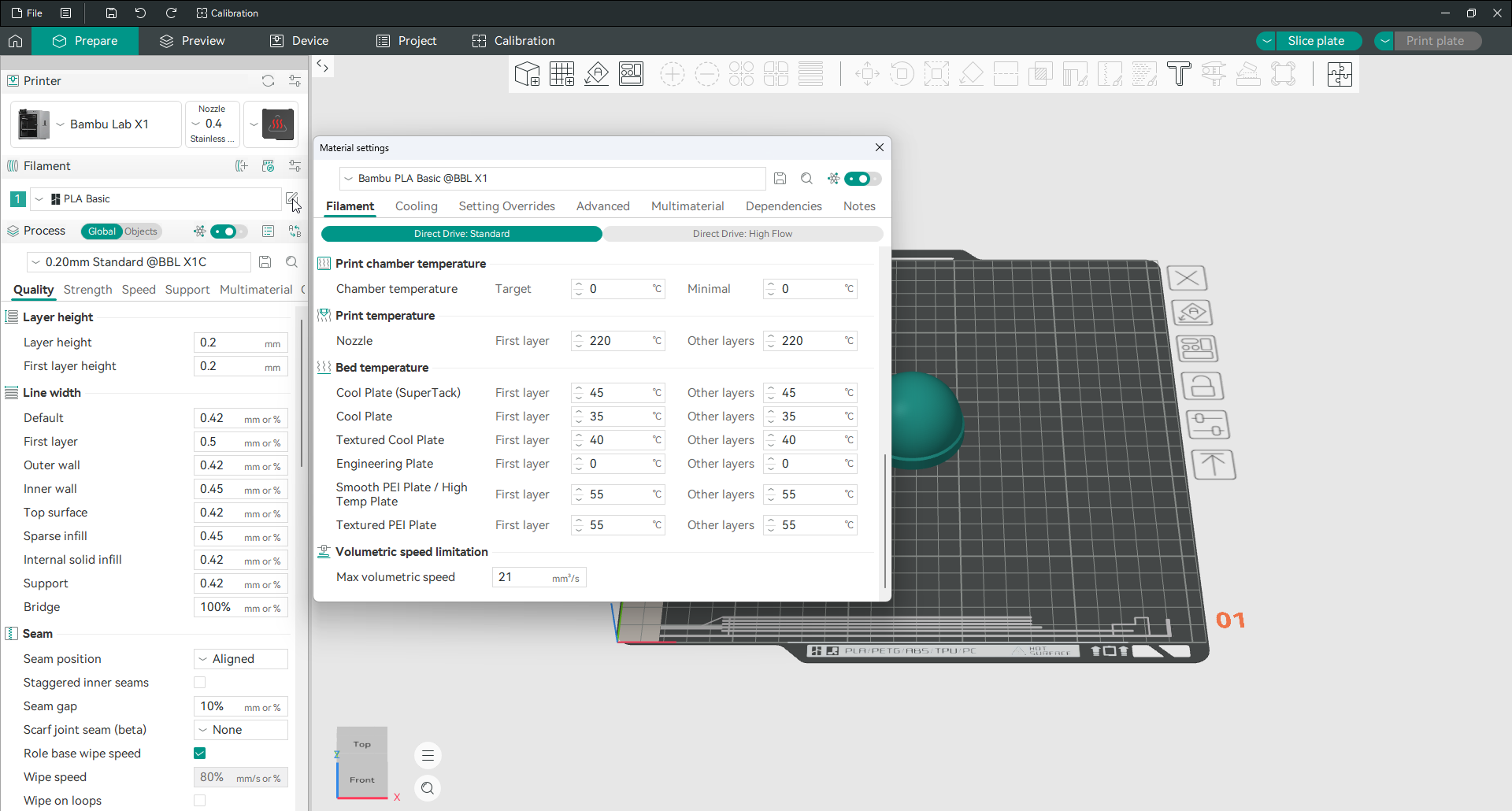
In filament settings, the material must have Activate temperature control turned on, with a target temperature set.
In printer settings, the printer must have Support control chamber temperature turned on, which tells Orca Slicer the machine actually has a heated chamber.
With both enabled, an M191 command is inserted at the very start of the G-code, before your machine start code runs, so the chamber is at temperature before the first layer. If the printer also has an auxiliary fan, it runs during heating to circulate the warm air.
Setting it manually in the machine G-code
If you would rather place the command yourself, or your setup needs it in a specific spot, you can write it into the Machine G-code tab using the chamber temperature variables.
To use the value set for the first filament:
M191 S{chamber_temperature[0]}To use the highest chamber temperature across all the filaments in the print:
M191 S{overall_chamber_temperature}The second form is the safer one for a multi-material print, since it makes sure the chamber is warm enough for whichever material needs it most.
Setting up the chamber heater in Klipper
Klipper does not know about M141 or M191 out of the box, so you define them as macros. This reference configuration creates a chamber heater and both commands:
[heater_generic chamber_heater]
heater_pin: PB10
max_power: 1.0
# Use the sensor that monitors the chamber air, not the default PTC probe
sensor_type: NTC 100K MGB18-104F39050L32
sensor_pin: PA1
control = pid
pid_Kp = 63.418
pid_ki = 0.960
pid_kd = 1244.716
min_temp: 0
max_temp: 70

[gcode_macro M141]
gcode:
    SET_HEATER_TEMPERATURE HEATER=chamber_heater TARGET={params.S|default(0)}

[gcode_macro M191]
gcode:
    {% set s = params.S|float %}
    {% if s == 0 %}
        M117 Chamber heating cancelled
    {% else %}
        SET_HEATER_TEMPERATURE HEATER=chamber_heater TARGET={s}
        # Uncomment to use the heated bed to help warm the chamber
        # M140 S100
        TEMPERATURE_WAIT SENSOR="heater_generic chamber_heater" MINIMUM={s-1} MAXIMUM={s+1}
        M117 Chamber at target temperature
    {% endif %}
Change the pin names and sensor type to match your own hardware. With this in place, M141 sets the chamber target and M191 sets it and waits, so the print holds until the chamber is ready.
The macro does two useful things worth pointing out. If the target is 0 it cancels cleanly instead of erroring, and the commented M140 S100 line lets you press the heated bed into service to warm the chamber faster on machines without a dedicated chamber heater.
When you do not have a heated chamber
Many printers have no chamber heater at all, and that is fine. An enclosure on its own, even an unheated one, traps heat from the bed and hot end. That raises the internal temperature and cuts warping on ABS considerably. If you print ABS or ASA without a heated chamber, simply enclosing the printer is the single most effective thing you can do.
Related settings live on the air filtration and auxiliary fan pages.
Frequently asked questions
What chamber temperature should I use for ABS?
Around 40 to 60 °C. A warm chamber keeps ABS from warping and cracking and improves layer bonding. If your printer has no chamber heater, simply enclosing it gets you most of the benefit.
Should I use a heated chamber for PLA?
No. Set chamber temperature control to 0 for PLA. A warm chamber softens the filament above the hot end and causes clogs. This applies to PETG, TPU and PVA as well.
What are M141 and M191 in Orca Slicer?
They are the G-code commands that control an active chamber heater. M141 sets the chamber target temperature; M191 sets it and waits for the chamber to reach it before printing begins.
Why is Orca Slicer not setting my chamber temperature?
Two boxes must both be ticked: Activate temperature control in filament settings, and Support control chamber temperature in printer settings. If either is off, no M191 command is inserted.
Can I control the chamber heater with Klipper?
Yes. Klipper has no built-in M141 or M191, so you define them as macros pointing at a chamber heater. A reference configuration is above; change the pins and sensor to match your hardware.